
Most of the fleet GPS tracker regrets I’ve heard from operators don’t start with bad hardware. They start with treating the purchase as product shopping instead of asset classification.
A fleet manager orders a device — often the one at the top of a procurement shortlist or the one a peer recommended at a trade show — installs it across a mixed asset base, and six to twelve months later the field is quietly a mess. Some vehicles work great. Some trailers have dead trackers. Some pallets never reported at all. Coverage on paper, chaos in practice.
The pattern underneath those deployments is almost always the same: the organization bought a tracker for a product category (fleet tracking) but the fleet contains multiple fundamentally different asset categories (vehicles, trailers, containers, pallets, reefer units). One device spec can’t serve all of them, no matter how good the device is.
This piece is written for North American fleet managers about to buy hardware for a 50-to-500 asset fleet, across a mix of powered vehicles, unhitched trailers, returnable transport items, and cargo. Most public GPS tracker buying guide content is structured around product features; this one is structured around asset classes, which is the decision that actually determines whether the deployment works. The five mistakes below are the ones I’ve watched drain procurement budgets most quietly — not because they’re sophisticated, but because they hide inside a buying process that looks reasonable from the outside.

Why do fleet GPS purchases fail even when the device is good?
Because the device was matched to a vendor, not to the asset. This is the default failure mode for fleet management hardware procurement, and it repeats across organizations large and small. The procurement team does their job competently — they shortlist vendors, negotiate price, check references — and still end up with a field deployment where a meaningful slice of units quietly underperform, support tickets pile up, and nobody connects it back to the original purchase decision.
Most procurement processes put three tracker brands on a shortlist, compare spec sheets line by line, negotiate on price, and pick a winner. The entire comparison happens at the product level. What should be happening first is an asset inventory that splits the fleet into classes by two simple properties — does the asset carry its own power, and how much does it move — and then, only then, looking at what tracker category fits each class.
Queclink, a peer hardware maker, published last week that “a common mistake is selecting a single device model for the entire fleet. This leads to poor fitment on some vehicle types, which causes unreliable data and field complaints.” That line captures the exact failure mode: the buyer treated the fleet as homogeneous, and the field treated the decision as a support ticket six months later.
Here’s the hard reframe: before you write an RFP, you need an asset classification matrix. Not a vendor comparison. The matrix comes first.
Mistake #1: Are you treating every asset in the fleet as the same class?
The most expensive mistake is the one that looks like a best practice. Standardizing on a single tracker model across the fleet sounds like disciplined procurement — one SKU, one training manual, one integration to the telematics platform, one support line. In reality it forces one device’s compromises onto every asset, and the worst-fit assets pay the tax. Asset tracking is not one problem with one product answer; it’s several problems that happen to share the word “tracking.”
A classification matrix built on two axes solves this before any device enters the conversation.
The first axis is onboard power: does the asset have its own 12V/24V/48V electrical system the tracker can tap into (trucks, vans, construction equipment, e-scooters), or is it an unpowered asset that the tracker must carry power for on its own (pallets, unhitched trailers, shipping containers, returnable packaging)?
The second axis is movement pattern: is the asset in active high-mileage use with frequent ignition events (delivery vans, long-haul tractors), or is it mostly idle with occasional transits (pallet pools, rental equipment, spare trailers)?
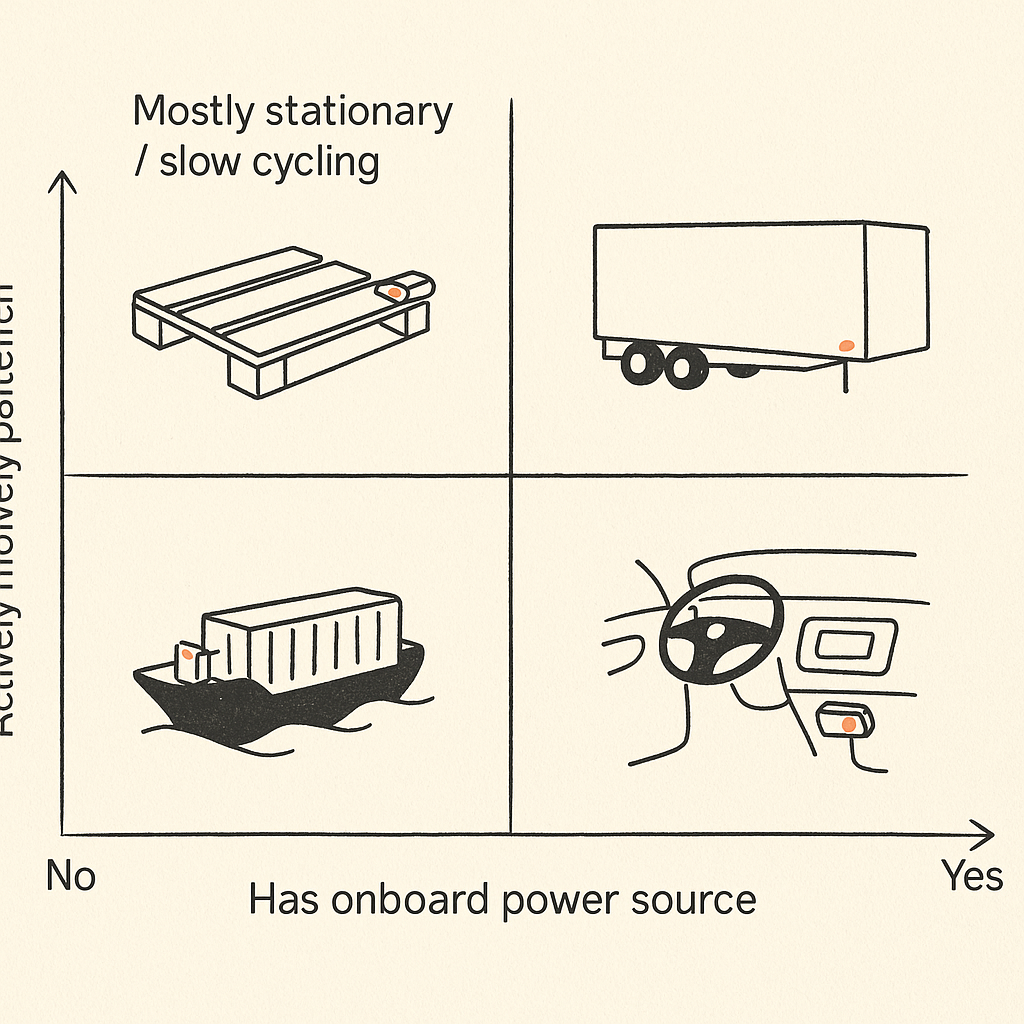
Those two axes give you four quadrants, and each quadrant genuinely needs a different tracker class. An active vehicle with onboard power belongs on a wired LTE CAT-1 unit with ignition detection and a relay for engine control — something like the Eelink TK417 or its peers in the 4G vehicle-tracker category. A passive pallet with no onboard power that cycles slowly through a closed-loop supply chain belongs on a multi-year battery tracker reporting once per day — the Eelink GPT50 sits in this class along with equivalents from Digital Matter and Queclink.
These are not substitutes for each other. A TK417 on a pallet would be useless within a day because it has no meaningful battery for unpowered operation. A GPT50 on a delivery van would report once per day — roughly 1,400 times less often than you need for a fleet dashboard to mean anything.
Once the matrix exists, device selection becomes almost boring. Most of the complexity in standard asset tracking buying guides evaporates because you’re no longer picking between incomparable options.
Mistake #2: Are you buying “long battery life” when you actually need real-time reporting?
Marketing copy has trained a generation of fleet managers to treat “10-year battery” as a universal virtue, and the result is procurement teams quietly picking devices whose duty cycle is fundamentally incompatible with their use case.
Multi-year battery life is achieved by reporting infrequently — usually once per day, sometimes once per motion event. You can’t have it both ways. The physics of a non-rechargeable 24,000 mAh cell means that continuous cellular wake-ups and GNSS fixes drain it in weeks, not years. The trackers marketed with “up to 10 years” numbers are assuming a specific duty cycle that looks nothing like a working delivery fleet.
A passive asset that sits in a yard 300 days a year and occasionally moves between depots is a genuinely good fit for a once-per-day report. A delivery van that a customer-service team needs to locate at 3:47 PM on a Tuesday is not. You can’t compensate for a low-duty-cycle device on the van side by turning up the reporting frequency — the battery math stops working at anything more than a handful of daily reports.
The correct way to think about this is that battery life is a system property, not a spec-sheet number. I wrote about that in detail over on the Eelink engineering blog about multi-year LTE-M/NB-IoT asset tracker design, but the short version is: your reporting cadence, retry behavior, sensor workload, and coverage quality all spend your battery budget. You can’t buy your way around that with a marketing number.
The rule I use with buyers: if your ops team needs to know where the asset is within 15 minutes at any time, you need a powered or rechargeable tracker, not a long-standby one. If the answer to “where is it” only matters once a day — or only when something goes wrong — long-standby is the correct class and saves you enormous operational overhead.
Mistake #3: Do you know the three distinct power-source categories?
Closely related to mistake #2, but distinct enough to warrant its own treatment: treating “battery-powered” as a single category instead of three. The power-source category of a tracker determines more about its deployment reality — installation cost, maintenance cadence, field-swap economics, warranty behavior — than almost any other spec on the sheet, and fleet managers routinely collapse three very different categories into one line item.
There are three real power-source categories for fleet trackers, and they map to completely different deployment models:
Vehicle-wired trackers draw from the 9-to-48V electrical system. They use active reporting modes because power isn’t a constraint — only cellular data is. The TK417’s power profile is typical: around 800 mA transmitting, 22 mA idle, 3 mA sleep, with a tiny 200 mAh backup that only exists to send a disconnect alarm if someone pulls the harness. Installed once by a professional; works for the life of the vehicle.
Battery-powered long-standby trackers use a large non-rechargeable primary cell (the GPT50’s 24,000 mAh lithium-manganese) for assets where recharge is infeasible: no power, not returning to a depot on a schedule. These devices are attached once — screwed into a cavity or stuck on with industrial adhesive — and left for years.
Rechargeable portable trackers occupy a middle ground: moderate batteries (typically 1,000-10,000 mAh), meant to be swapped between assets or recharged at a yard. They’re the right call for short-term tracking, rentals, or situations where an operator actively manages the tracker as a separate thing.
Buying from the wrong power-source category guarantees downstream pain. A long-standby device on a vehicle means losing ACC detection, the engine-control relay, driver ID, and the fleet management features that justify tracking a vehicle in the first place. A vehicle-wired tracker on an unhitched trailer is a paperweight the moment the trailer is disconnected.
Mistake #4: Are you conflating “tracking” with “monitoring”?
Most fleet-tracker RFPs ask for location. That’s tracking. The RFPs that actually survive contact with operations also ask for condition. That’s monitoring — and it’s a completely different hardware problem. The hardware requirements for monitoring are a strict superset of tracking, and trying to retrofit monitoring onto a pure-tracking device is where most cold-chain horror stories come from.
If the asset is carrying temperature-sensitive cargo, the tracker needs a real temperature probe (ideally two — internal ambient plus external probe) with calibration traceability, threshold event logic that defines excursions by duration plus magnitude rather than single data points, and the data integrity features that make the log defensible in an insurance claim or FDA audit. The Eelink GPT29 is in this class — multi-sensor cold chain device with shock, light, humidity, and temperature, purpose-built for evidence-grade compliance work. The TK417, with optional wired temperature probes and BLE beacon gateway, can monitor cold chain on a moving vehicle where the vehicle provides power, but it’s not the same device as GPT29 for a passive reefer container.
If the asset is a trailer you care about physical security for, the tracker needs motion detection with vibration thresholds and a light sensor for door-open events — the package you get in something like the Eelink GPT48-X magnetic tracker (5-year standby, 8,000 mAh, magnetic mount).
If the asset is a delivery vehicle and the monitoring you care about is driver behavior — a core fleet management concern — you need a completely different sensor stack: accelerometer calibrated for harsh-braking thresholds, ACC/ignition integration, and ideally an iButton or BLE driver-ID system. TK417 territory again, but with the driver-ID module, a specific configuration rather than the default SKU.
The pattern: monitoring is an asset-specific spec. You can’t answer it with a generic “GPS tracker.” You answer it by going back to the asset classification matrix and asking what conditions of that asset class the business cares about, then picking a device whose sensor suite actually maps to those conditions.
Mistake #5: Does your tracker’s IP rating match the deployment environment?
This is the mistake fleet managers catch latest — usually at the first heavy rain after deployment — and the fix is always expensive because it means field-swapping hardware across dozens of assets. Unlike the earlier mistakes, which surface as data quality problems over weeks, this one tends to surface as hardware failures after a single weather event, and by then the replacement cost already exceeds whatever you saved on the original device.
IP ratings aren’t all created equal, and the difference between IP54 and IP67 is the difference between a device that survives a splash and one that survives being hosed down or temporarily submerged. An IP54-rated tracker inside a sealed vehicle cabin is fine — the enclosure isolation is the cabin. The same IP54 device on the outside of an ocean-bound shipping container or a flatbed trailer that sees Pacific Northwest winters is a failure waiting to happen.
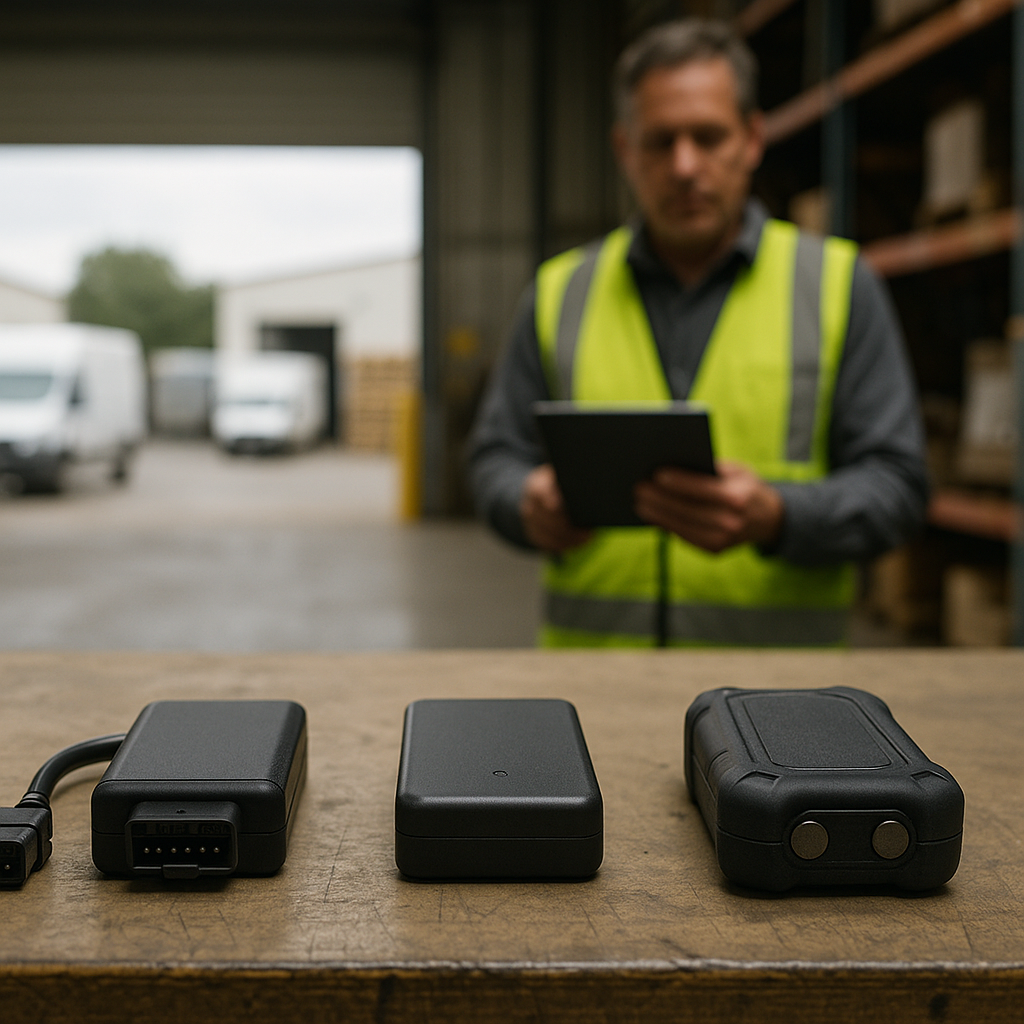
The quick guide most fleet managers never got:
- IP54 (like the TK417’s rating) is fine for cabin-mounted vehicle trackers. Splash, dust, light rain exposure from windows — all tolerated. Not acceptable for outdoor or undercarriage mounting.
- IP67 or IPX7 (the GPT50, GPT48-X, GPT29 ratings) is what you need for anything outdoor, anything exposed to washdown, anything riding outside a trailer or on a chassis, and anything that might sit in standing water.
- IP69K is reserved for devices that must survive high-pressure and high-temperature washdown — cold chain logistics and dairy/meat processing fleets sometimes need this; most don’t.
The penalty for over-speccing IP rating is a few dollars per unit. The penalty for under-speccing it is replacing the device plus losing whatever shipment or asset you were tracking when it failed. Over-spec when in doubt.
What does a correct classification-first buying process look like?
A classification-first buying process for GPS tracker procurement reverses the usual sequence. Instead of starting with a vendor comparison and forcing asset types into the winning device, you start with an asset inventory, map each class to a tracker category, then and only then compare specific devices within each category. The four steps below take about two weeks longer than “standardize on one SKU” but save a year of field complaints.
- Inventory the fleet by asset class, not by vendor preference. List every asset type you need to track. For each, record: onboard power (yes/no), typical movement pattern (active vehicle/slow-cycling/mostly idle), deployment environment (cabin/outdoor/industrial), what condition data matters (location only/location + temperature/location + security events/driver behavior).
- Map each asset class to a tracker category, not a specific SKU. Active vehicle → wired 4G vehicle tracker with ignition integration. Passive long-cycle asset → multi-year battery LPWA tracker. Cold chain → multi-sensor compliance tracker. Magnetic-mount trailer/container → long-standby magnetic tracker.
- Only then shortlist devices within each category. Compare two or three genuine peers in each category on the specs that actually matter for that category — not on a unified spreadsheet that forces you to compare a battery pallet tracker against a wired vehicle tracker on the same axes.
- Pilot each category separately with 20-50 units for at least 60 days before committing to fleet-wide deployment. The devices that fail in a pilot tell you something specific; failures in a mixed rollout tell you nothing useful.
One final thought: the buying guide content the tracker industry puts out is, understandably, structured around product features. Feature comparison is easy to write and easy to read. But the mistake this piece was really about is that features don’t matter until the asset class is decided — and no vendor is incentivized to tell you that, because it slows the sale. The work has to happen on your side of the table.
If you’re in the middle of a fleet tracker buying process and want to talk through how your asset mix maps to tracker classes — not a pitch, just a conversation — I’m happy to compare notes. Related writing on ultra-long-standby asset trackers covers the passive-asset side in more depth if that’s the category you’re stuck on.